



















Before Your First Game: Getting Team Access for the Game Sheet App

As a member of the team staff, you will have been provided access to a team code that allows you to load all of your home and away games for the entire season. These are home and away codes that can be loaded via one 8 digit team code. When you registered the team, the coach or manager would have been provided with the username and password to access the Team Website located at https://admin.rampcms.com/login

At the top of the team website page is your 8 digit code for the game sheet app.
The left-hand menu options on the team website page also allow you to access the “League Ganesheet App Codes”. Clicking this option will bring up the codes for any scheduled games.

There is an option to Export & Download all the codes. It is a good idea to do this so you can have them handy or even print them to give to your scorekeeper or timekeeper.
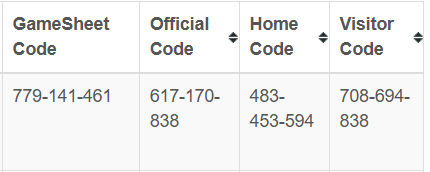
The above is a sample of the codes you will see/download
The scorekeeper will use the GameSheet Code to complete the game sheet and should also have the Official Code in case the referees do not want to use their own device. Those with the Gamesheet code can add or change everything EXCEPT the home or visitor rosters and officials reports.
The home team coaching staff will use the Home Code to list their roster and coaching staff.
The visiting team coaching staff will use the Visitor Code to list their roster and coaching staff.
The referees will use the Official Code to sign-off the game sheet
Ensure you have downloaded and installed the RAMP Gamesheet App prior to your first game.
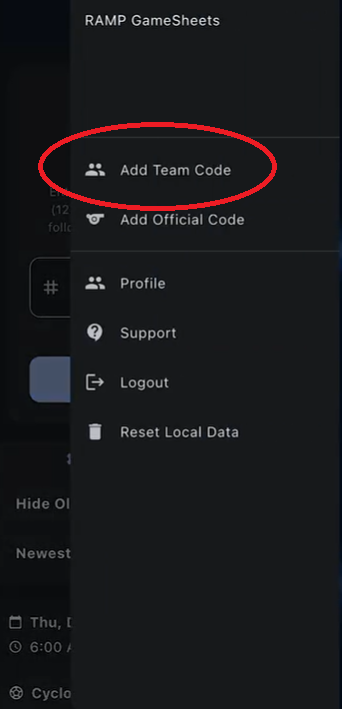
Open the Game Sheet App. If this is your first time logging into the Game Sheet app, you will have to create an account. Your Registration account will not open on the apps. You can use the same email to create the account on the app but you'll be creating a new account when you do so.
You can add the team code by clicking the hamburger menu in the top right corner of the RAMP game sheet app and hitting “Add Team Code”.

Here you can add your 8 digit team code (you do not have to put in the dash) that you got from your Team Website and hit “Add Team Code”. Once added, you'll be able to see that code and that team listed on the “My Teams” area. This will automatically upload all upcoming home and away games for this team for you to be able to access. Please give the app 30 minutes to an hour to load all of your upcoming games. Once you have added the team code, you'll be able to find on the game codes page all of your upcoming home and away games.
Coaches - At The Game

Enter the home or away code (depending on whether you are the home or visitor team) in the game code area at the top of the page for your game. Simply tap on the game code area, type in the 9- or 13-digit code and hit add code.

Once you have hit the "Add Code" button, it'll load you into the game you just added the code for. For your team, select which players and staff are participating. You'll also be able to see which players and staff have been selected as playing in this game for the opposing team.

Once you have completed that step, you can sign off on the game sheet by going to the game details page and hitting sign digitally. You may have to allow the location services for your digital signature to confirm you are at the location of the game.

With the home and away code, you also have access to add notes on the game that is viewable by anybody else inside of the game. These are also logged and viewable to the admins and league.
Finally, ensure your scorekeeper or timekeeper has their code to score the game.